
How to get an urgent notice seen on school computers
Most notices can wait for someone to glance at them. Some should not: a room that has changed in the next five minutes, a system about to go down. A Priority notice is Courier’s way to make a notice stand out and keep coming back until someone acknowledges it.
An extra channel, never a replacement #
Courier is an extra channel, never a replacement for your fire alarm, PA or bell, radios, or your school’s lockdown procedure. It cannot promise that every screen shows a notice: a computer may be off, asleep, locked, signed out, muted or out of reach. It is for urgent everyday notices, not for emergencies.
What a Priority notice does #
- On the computer it has a red PRIORITY NOTICE band across the top.
- It can play a short sound, if you tick that and an administrator has not switched sounds off.
- The window comes back to the front of the screen about once a minute until it is acknowledged or expires.
Send one #
- Write the notice on New notice as usual and tick Send as a Priority notice. The expiry starts at 15 minutes; choose a longer one only on purpose.
- Tick Play a short sound on the computer if you want one.
- In the preview, read the warning and tick I have read this, and I am using Courier as an extra channel only. You cannot send until you do.
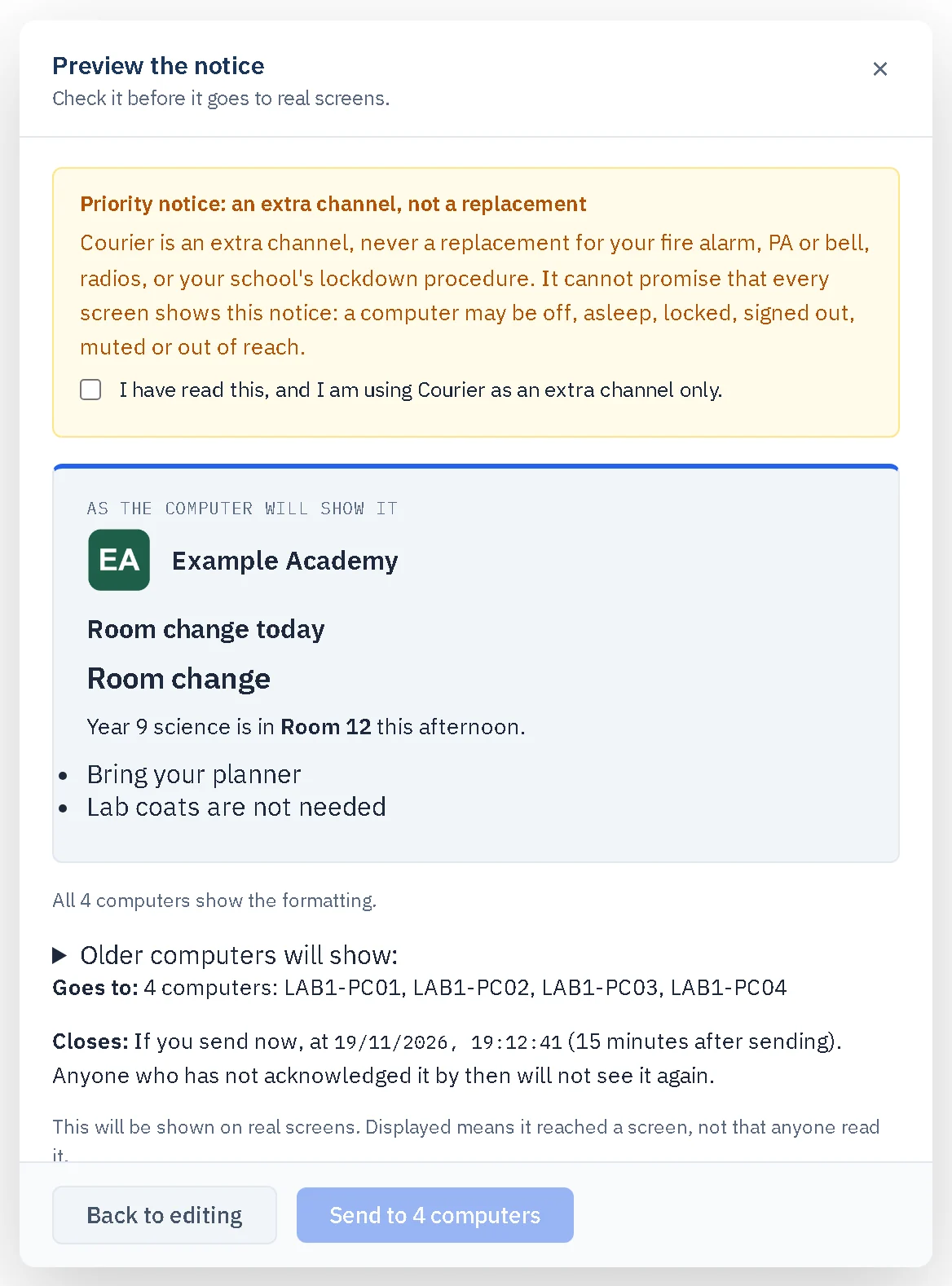
Administrators can always send a Priority notice. A sender can only if an administrator allows it under General Settings, Users.
Cancel it, or send an all clear #
Open the notice from History. Its Results page has a Withdraw this notice card:
- Cancel this notice closes it. Computers showing it are told to close it, and computers that have not shown it yet will not show it.
- Send all clear closes it and shows your own message instead (for example “All clear. Back to normal.”) with a green ALL CLEAR band.
Limits to know about #
- A computer whose RSJ Agent is too old shows a Priority notice as an ordinary notice, and cannot close it. The preview and Results say how many.
- A computer that is locked or signed out does not show the notice until someone signs in.
- Results tell you how many computers displayed it, but not who read it.